Translating the state diagram into program code
Thus far you have seen how to design a Finite State Machine as an abstract diagram
involving states, events, state transitions and actions.
Now I shall show you how this can be translated into program code.
I will be using 2 languages, VB.NET from Microsoft and my company's SPLat language with MultiTrack.
These are both nominally BASIC languages, yet the differences are quite profound.
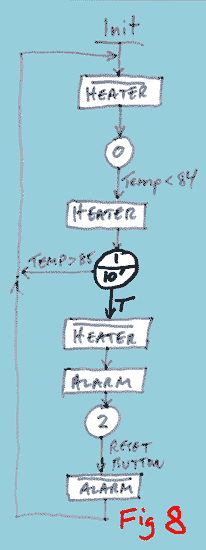
The state machine I will use is the one in figure 8.

SPLat with MultiTrack™
This is our proprietary language, developed at SPLat Controls especially for embedded realtime machine controllers. It is heavily
biased towards FSMs and multitasking.
Visual Basic .NET
I selected this because:
- Visual Basic is very popular and its syntax is fairly transparent, even to people with no previous exposure to BASIC
- BASIC is often the language of choice for non-professional programmers (though many professionals use it as well).
- Visual Basic is an event driven language. This means that when something happens a subroutine or function
is triggered that is designed to handle that event (called an event handler). This is very close to the same
as what happens in preemptive multitasking realtime operating systems
- VB.NET is available free from Microsoft. It is called Visual Basic 2008, Express Edition.
You can download it here
.
You will be able to follow the example without replicating it on your own computer. If you are reading this
with passing interest only, that's fine. If you really want to learn about FSMs then it will be worth the time and effort
to download VB.NET and learn how to drive it. If you do, you will be able to modify my example and then go on to creating
your own, which is the best way to learn.
This link may not work forever. It is current at time of writing.
If it fails you please contact me via the contact page. You should
be able to find the current version by googling for "free vb.net download"
Click for a discussion of various types of realtime operating system.