State Diagrams 6, Actions
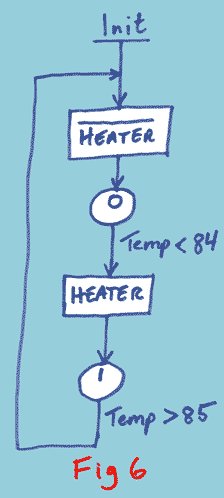
Figure 6 introduces several new concepts:
- Several states can be combined to form a complete state diagram (I am sure you saw that one coming!)
- Events can be something more than an input turning on or off. In this case it
is a temperature measurement being compared with some limit values.
- Actions, represented by rectangular boxes.

- A clearly defined place where the state machine starts, denoted in this case as "Init" (initialize).
There are two action boxes in this state diagram. One turns a heater off and one turns it on. The turn-off uses the same
bar across the top of the word as I used for an input being off.
Can you work out what this state machine is for? The answer is here:
Most styles of state diagram tend to make actions the poor relatives,
relegating them to minor annotations either on the connecting lines
(like the event labels) or inside the state circles/rectangles.
I believe the actions need to be given equal billing with the events
and the states.
This state machine will control the heater in a tank or vat, and maintain the
temperature at about 85°C. Initially it turns the heater off. In
state 0 it waits for the temperature to fall below 84°C. When
that happens it turns on the heater and goes to state 1. In state 1
it waits for the temperature to rise above 85°C. When that
happens it turns off the heater and switches back to state 0.