VB.NET - Code overview
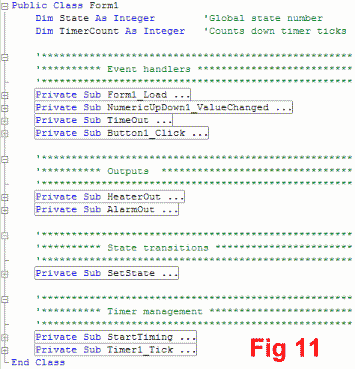
Figure 11 is a listing of the program that has been collapsed to give an overview of the various subs
(in VB.NET subs used more frequently than functions, though the two are very similar)
I have grouped the 9 subs into logical groupings, to help you see the overall pattern.
Global variables
Two variables are declared (DIM'd) at the top of the program..
- State. This is the state number, and is identical to the numbers in the circles in the state diagram.
- TimerCount. Used to count off ticks of a 100mS timer to generate longer delays
Event handlers
These are the subs that respond to the various events that can occur during the life and times of the FSM.
- Form1_load. This corresponds to the Init item in the state diagram. It contains the things
that are needed to initialize the FSM. In my code there is a bit of stuff required by VB.NET for housekeeping
and cosmetics.
- NumericUpDown1_ValueChanged. Runs whenever the simulated temperature changes.
- TimeOut. Run whenever the countdown time (described later) hits zero
- Button1_Click. Run when the alarm reset button is clicked
Outputs
I have chosen to locate the output simulation code in separate subs. This makes it easier if you want to change
how an output is simulated. The two outputs are the heater and the alarm indicator.
State transitions
I have made a single sub that handles all the state transitions. It is called with the
destination state number as its argument. It switches the global state number and performs all required
actions. 
Timer management
My particular style of creating timeouts in VB is to use a timer control with
a short interval and to count off Timer_Tick events.
- StartTiming. Called to start timing a timeout interval, with the required interval as its argument
- Timer1_Tick An event handler for the VB.NET timer that generates a 100mS timebase
Now here's an important point: I choose to make my FSMs such that
all actions are associated with the entry into a state. They
are entry actions. By executing all actions as part of the entry,
I am able to write just one piece of entry code for each state. I don't
need any exit action code, which is a huge benefit because the decision
to exit a given state can be made in several event handlers.