dw2
1. Download SPLat Firmware
=================
== Version 4.3 ==
=================
03Aug2018
- VM: comms profile 5 was 8bits, odd_parity, 2stop but should have been no_parity as per MODBUS standards
- VM: reading the internal analogue reference via a float (ie in the VM) now returns a normalised number based on the ST factory calibration value (multiply by 3.3 to get Vcc)
- VM: floatFromU was not working correctly for negative numbers.
- VM: OBLCD_Dim may now be used without throwing an error on boards that only support a virtual LCD, it is simply ignored.
- STM32F3: can now measure the 3V3 rail based on an internal reference
- STM32F4: can now read the 3V3 rail
- VM: A race condition existed in the QuadratureCounter that could cause wrong readings to be returned, often this was seen when moving backwards with the count being returned as a large positive number rather than a small negative number.  Thanks to Michael B for spotting this.
- VM: ARM controllers now support UVtoNV for NVEM page 1 and up.
- VM: ARM based OBQC_fGet used to return 0 thru 16777215, but this meant moving backward from 0 would cause a jump to 16777215.  So now it returns negative, which is the same as 8bit SPLat controllers.
- VM: YieldTask may now be called in single tasking mode without throwing en error.  This is especially useful in subroutines which may be shared by both single and multi-tasking applications.
- VM: stop I/O messages during app upload
- DW2 demo, can now choose 485/TTL when there's an Xwire error
- VM: Oh dear, RTCDateToUV, RTCDMToUV, RTCHHMMToUV, RTCHHMMSSToUV were all incorrectly using the _current_time_ rather than the values in the RTC registers.  So functions like OBLCD_HHMMSS were displaying the current time rather than the time in the RTC registers.
- VM: the delay between a slave receiving and replying was to quick causing legacy controllers to miss the response, increased to around 500us.
- VM: Fixed InputOM that was returning wildly incorrect values.
- VM: SPxChOut is no longer NULL terminated, allowing V to be any value without impacting the data in U.
- ARM: fixed a reset that could occur if Xwire Slave was restarted when it & MODBUS Slave were operating simultaneously.
- ARM: WarmBoot now doesn't cause an error, it just restarts the VM.  This is the same behaviour as the 8bit controllers.
- ARM: SEXI was incorrectly calculating the output size limit, so a value of 37 outputs which is legal was throwing a "too big" error.
- VM: SPx callbacks modified to receive the registered address, this allow multiple instances to exist.
- VM: floatFromU and fixToU were corrected to treat W as big endian when transferring between U
- DW2: default SEXI app now supports address change on the fly and auto detect of TTL/485 ports.
- ARM STMicro boards: If MODBUS was set to 8 data bits even parity, a 0x00 would cause a LIN break and resulted in the packet being dumped resulting MODBUS errors (typically no response if the SPLat is a MODBUS slave).
- VM: sometimes a controller running MODBUS would reset when SPLat/PC connected due to an incorrect method of mutex release when closing the MODBUS port.
- ARM: a 16bit and 24bit ID is now available on all ARM boards.  These are a CRC of a bigger ID so there's a small chance two controllers may have the same ID (chance is obviously less with the 24bit version).
- VM: fixed a serious bug in fSTTimeSince & STTest that 2 days after the controller is turned on made both functions think the elapsed time is always greater than 167772.16s.
- ARM: The SPLat/VM on ARM boards was throwing a RAM OutOfBounds error when trying to access byte 250 which is actually the legal last address.
- VM: Doing a fGetTimer or Test quickly after starting a timer may sometimes have caused the timer to expire immediately.
- DW2: switching channels wasn't throwing away the rubbish samples.
- VM: WtoU, QtoU, UtoW, UtoQ, fixToU, floatFromU, would incorrectly error when loading a float into U[16+]

=================
== Version 4.2 ==
=================
10 May 2016
- First formal release
- DW2: enabled EEPROM driver
- DW2: V4.2; Now supports 2 ADC channels
- VM: WaitOnKT wasn't working (incorrect opcode length)
- VM: GoIfInOn/Off/K were ignoring "J"
- VM: Fixed STTest which was not working correctly due to a typo.  It was especially worse with small delays.
- VM: NVReadRec & NVWriteRec were incorrectly expecting a 16 bit address but it's only an 8 bit address.
- VM: A change to detect duplicated slave entries in the Xwire table was preventing correct parsing of the table, meaning slaves often weren't being added to the I/O map.
- OS: Saw the 1 second timer getting delayed, manifested by ComTestStartTimer taking 13 seconds dignal rather than 10.  Due to timers being deleted before the next timer was fetched.
- VM: ComTestStartTimer now using fast tick to avoid expiring after 9 - 10 seconds (only following RUN from SPLat/PC, power on was always 10s).
- VM: XwireGetPollCntr now increments as soon as a packet is received rather than at the start of sending the response, this also fixed a problem where poll count was not incrementing if the slave had no data to return; interpacket time delays have been shortend to increase throughput.
- VM: Fixed display of PermStore values in the "Module" window in SPLat/PC as all bytes were off by 1, thus the first byte was always missing and the "status" was never correct.
- VM: the Xwire LCD master now sends zeroes for the command bytes (blink, etc) otherwise sending these bytes sent garbage and stuffed up the LCD.
- VM: SEXI was not working when analogue I/O didn't start at 0
- OS: analogue output number is now contigous as there would have been problem if a DAC was in the middle of PWM
- VM: now able to report analogue I/O when numbering doesn't start at 0

=================
== Version 4.0 ==
=================
10 Aug 2015
- First release
2. Download STMicro DFU Demo
Download then install the STMicro DFU “demo” making sure you unstall any old version first. This tool will upload the firmware to your SPLat controller. You will need a USB Type-A to Mini-B cable.
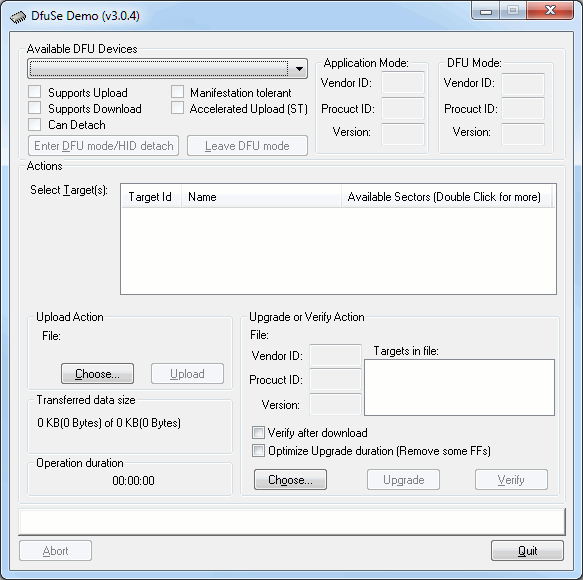
- Install the DFU Demo before connecting your controller to the PC. Run the DFU Demo and you’ll see this:
- Install the PGM link on your controller, then apply power and connect it to your PC. (If you’re using the EC1, holding the button down when connecting USB will enter download mode) The DFU Demo will now show an available device:
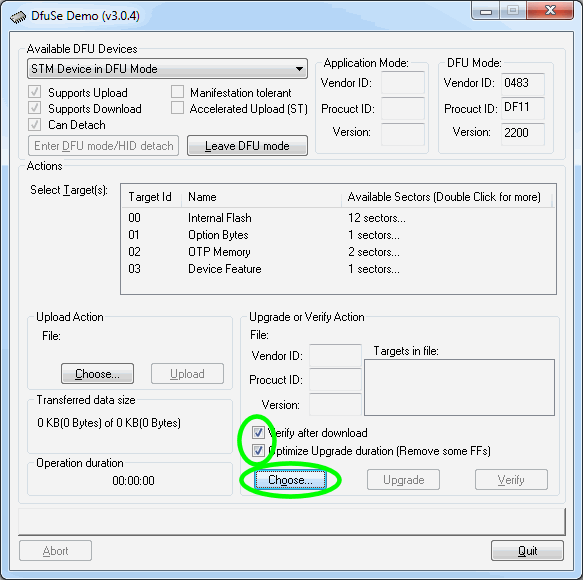
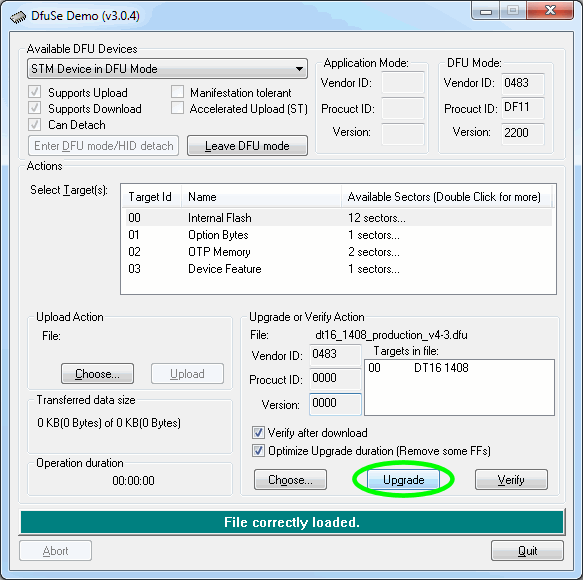
- Tick the boxes as shown, the click Choose and select the controller firmware file you downloaded above.
- Now click Upgrade:
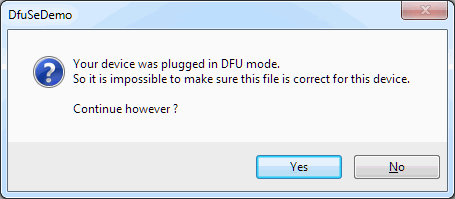
- If you see this popup below, click Yes then wait about 30 seconds. Sadly there’s a bug in the downloader and it will crash if you don’t wait for a bit. If you hear the USB boing bong sound, you’re good to proceed to the next step.
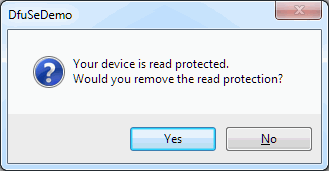
- Just say Yes. (But if you saw the read protected popup, be sure to wait about 30 seconds before clicking Yes.)
- Now the new firmware will be uploaded and at the end you’ll see this
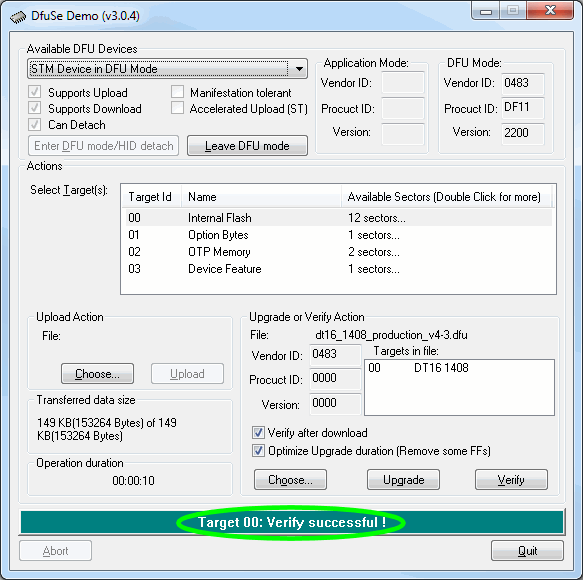
- All done. Remove the jumper and USB cable, then power cycle your controller. You’ll need to reinstall your SPLat application.
Please be sure to tick the “Verify after download” and “Optimize Upgrade duration” checkboxes before upgrading the firmware
If you’re not sure what you want, give us a call: +61 3 9773 5082