ec1
1. Download SPLat Firmware
==================
== Version 4.14 ==
==================
ec1_release_v4-14
12 Sep 2016
- VM: fixed a serious bug in fSTTimeSince & STTest that 2 days after the controller is turned on made both functions think the elapsed time is always greater than 167772.16s.
- EC1: Fixed annoying "no 1sec tick" RTC calibration error.
- ARM: The SPLat/VM on ARM boards was throwing a RAM OutOfBounds error when trying to access byte 250 which is actually the legal last address.
- VM: Doing a fGetTimer or Test quickly after starting a timer may sometimes have caused the timer to expire immediately.
- VM: WtoU, QtoU, UtoW, UtoQ, fixToU, floatFromU, would incorrectly error when loading a float into U[16+]

==================
== Version 4.13 ==
==================
09 May 2016
- Label wasn't applied for 4.12
- VM: WaitOnKT wasn't working (incorrect opcode length)

==================
== Version 4.12 ==
==================
07 May 2016
- OS: OBLCD now returns a SeqCount whenever the buffer has changed so the caller can refresh only when necessary.
- HMI: OBLCD text can now be displayed on the HMI, including that received when the HMI is a Xwire slave via:
   iiPrintText COMHMI,'1,"g",'3
  The current font, colours and bounds will be applied.  Each call updates the display once, so it should be done in a loop usually with a Pause.
- EC1: test procedure updated to cope with input being opposite polarity to output; fixed crash in VM_vSetPWMFrequency() due to incorrect number of outputs limit, updated to latest OS.
- VM: GoIfInOn/Off/K were ignoring "J"
- VM: Fixed STTest which was not working correctly due to a typo.  It was especially worse with small delays.
- VM: NVReadRec & NVWriteRec were incorrectly expecting a 16 bit address but it's only an 8 bit address.
- VM: A change to detect duplicated slave entries in the Xwire table was preventing correct parsing of the table, meaning slaves often weren't being added to the I/O map.
- OS: Saw the 1 second timer getting delayed, manifested by ComTestStartTimer taking 13 seconds dignal rather than 10.  Due to timers being deleted before the next timer was fetched.
- VM: ComTestStartTimer now using fast tick to avoid expiring after 9 - 10 seconds (only following RUN from SPLat/PC, power on was always 10s).
- VM: XwireGetPollCntr now increments as soon as a packet is received rather than at the start of sending the response, this also fixed a problem where poll count was not incrementing if the slave had no data to return; interpacket time delays have been shortend to increase throughput.
- VM: Fixed display of PermStore values in the "Module" window in SPLat/PC as all bytes were off by 1, thus the first byte was always missing and the "status" was never correct.
- VM: the Xwire LCD master now sends zeroes for the command bytes (blink, etc) otherwise sending these bytes sent garbage and stuffed up the LCD.
- VM: SEXI was not working when analogue I/O didn't start at 0
- OS: On ST micros, quadrature is now always 24bit even for 16 bit timers.
- ST quadrature now leves the pullup and drive modes unaltered
- OS: analogue output number is now contigous as there would have been problem if a DAC was in the middle of PWM
- VM: now able to report analogue I/O when numbering doesn't start at 0
- VM: low speed digital (OBCB) counting now works on ARM controllers.
- SPLatVM: SEXI was not turning off blinking outputs when SPLat/PC connected
- SEXI: a duplicate slave entry in the Xwire table now doesn't incorrectly increase the nof I/O's;
- VM: More than 10 analogues, in or out, are now correctly sent to SPLat/PC.
- VM: Now ensure countdown timers are cleared on VM reset
- VM: loss of SPLat/PC will now stop I/O update messages from being sent.
- VM: SEXI was not receiving any _additional_ buffer from the slave device.
- VM: fixes to Xwire slave LCD, esp when LCD isn't 20x4.
- VM: An ARM based controller running as an Xwire slave can now display LCD text broadcast from a Master Xwire controller.
- SPLatVM: Fixed "Not" which was converting 0 to 1 but should have been and is now converting it to 255.  This bring ARM boards in line with HC08 boards.
- SEXI: can now handle 64 analogue inputs (that's 8 DA8's!)
- ARM: fGoIfPos was getting confused by a -0.0, changed it and fGoIfNeg to use the signbit macro.
- VM: Xwire error counters were only incrementing in debug builds; Xwire was not incrementing the error counter if the received packet's length was wrong.
- VM SEXI:a bug occurred when slaves did not have inputs in multiples of 8 and this would cause inputs from one slave to overwrite inputs from another.
- VM: A recent fix for Xwire caused a regression in Xwire Master that caused it to access a NULL func ptr for XwirePhys when starting Xwire.
- fixed a regression in _iiPrintXXX when printing to RAM where the printing would begin at the second byte.
- EC1: XwirePhys mode 2 now tested and working, fixe the problem with pin swapping that required the UART be disabled first.
- Xwire: XwirePhys can now be done before starting Xwire

==================
== Version 4.11 ==
==================
25 Mar 2015
- ARM: STM32 serial port lines weren't being correctly configured, the DR8 Xwire & RS485 ports weren't working; Changing interface no longer resets the port, it now just notifies the app
- SEXI: All digital I/O's have been compacted so there are no unused lines.  This means the Xwire table is now actual number of I/O's rather than blocks of 8.
- SPLat VM ARM:Any button press will now automatically turn on the backlight even if InputK isn't called.
- ARM VM: Permstore was not being correctly erased on program download and instead was returning a status of "success" but with all 0 bytes.
- The SEXI protocol could incorrectly report multiple InputK's as it wasn't confirming a change in sequence number from the slave.
- ARM: ComRunScript can now be called anytime to change MODBUS master scripts.  The current transaction will finish before the new script starts.

==================
== Version 4.10 ==
==================
27 Feb 2015
- ARM controllers now support MODBUS master
- ARM Controllers: Dialect is now 101 for Countdown timer support
- SEXI: after 8 tries, a disconnected peripheral will have it's reported inputs set to 0
- ARM dialect now supports legacy timers:
The next ARM dialect, 101, will include support for the "legacy timers", aka:
  Start
  Stop
  Test
  fSetTimer
  fGetTimer
  SetTimer
- ARM: The maximum Xwire message is now 64 bytes rather than 32 bytes.  This has been done to allow the DA8 to work as a SEXI device as it needs 35 bytes.
- SPLatOS: deregistering a serial port will now called a registered callback, allowing the current owner to clean up.
- EC1: The Xwire port may now be repurposed to user comms.  The XwirePhys instruction does this, 0 = single wire Xwire, 1 = dual wire RS485, 2 = dual wire TTL.  Both 1 & 2 use B14 & B15 for direction control.

=================
== Version 4.9 ==
=================
- Added support for SPx !CPU Miscellaneous resources
- Fixed CPU: Subroutine nesting depth
- NoJ is permitted when single tasking per David's request
- the VM was crashing the ARM if an attempt was made to deregister a serial port that hadn't been registered.  The serial driver now flags whether the port has been registered.
- following the thread switch change to use PendSV, Xwire broke because it was disabling interrupts while thread switching.
- RecallS now returns either 255 or 0 for simpler binary arithmetic
- reverted the original idea of resetting all outputs when SPLat/PC connects
- VM; fixed typo that caused access to analogue input to reset the VM; VM no longer resets serial port 0 if it's currently SPLatLink
- fixed overflow bug in COMRX_BufLen
- added faster baud rates

=================
== Version 4.8 ==
=================
- !Major problem in 4.7 caused the first task to run once, then RunTasksForever to fall through and run whatever followed it as the first task.
- Fixed underflow of RTCDecSS when RTC registers contain a date.

=================
== Version 4.7 ==
=================
- Added support for "SPxCmd1 0,!CPU" to allow the PWM frequency to be changed.

=================
== Version 4.6 ==
=================
31 Oct 2013
- Any attempt to display a float as 9,9 was failing.  Fixed.
- EC1 now supports a high speed quadrature counter on pins 26 & 27
- Added fCompareR instruction

=================
== Version 4.5 ==
=================
04 Oct 2013
- EC1 v4.4 wasn't working in XP because XP asked for a shorter version of the configuration packet but the SPLat USB driver was trying to return the whole packet.  Windows7 never asked for a shorter version so never exhibited this problem.

=================
== Version 4.4 ==
=================
30 Sept 2013
- inputs were mistakenly set to ACTIVEHIGH, have now been changed to ACTIVELOW with pull up resistors (matches the EasyStep description for inputs)
- an incorrect baud rate value in the comms control block could cause the board to crash, now it just causes a VM reset

=================
== Version 4.3 ==
=================
12 Sept 2013
- some architectural USB changes
- fixed occasional "Disconnected" error shown by SPLat/PC.  Moved reporting of analogue I/O count out of the polling thread.  Also now correctly reporting any dynamic analogue inputs.

=================
== Version 4.2 ==
=================
5 Sept 2013
- USB serial now detects and handles loss of polling, suspend and resume.  It will keep the app's buffer flushed under these circumstances.
- update to latest OS (there are more supported SPLatVM functions)

=================
== Version 4.1 ==
=================
2 Sept 2013
- USB serial now detects and handles loss of polling, suspend and resume.  It will keep the app's buffer flushed under these circumstances.  It's much more robust.
2. Download STMicro DFU Demo
Download then install the STMicro DFU “demo” making sure you unstall any old version first. This tool will upload the firmware to your SPLat controller. You will need a USB Type-A to Mini-B cable.
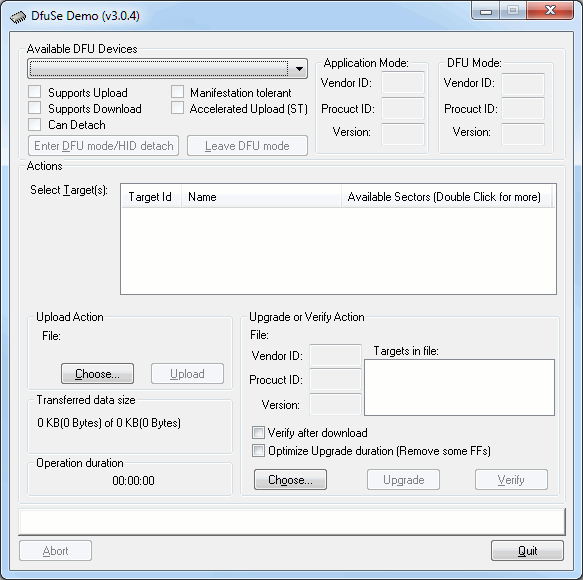
- Install the DFU Demo before connecting your controller to the PC. Run the DFU Demo and you’ll see this:
- Install the PGM link on your controller, then apply power and connect it to your PC. (If you’re using the EC1, holding the button down when connecting USB will enter download mode) The DFU Demo will now show an available device:
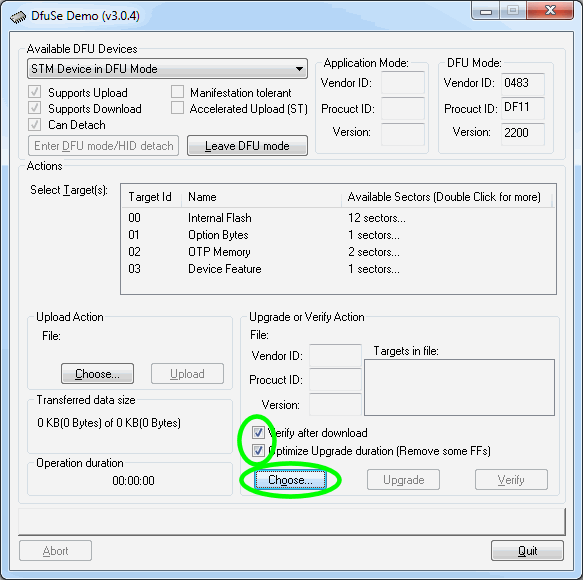
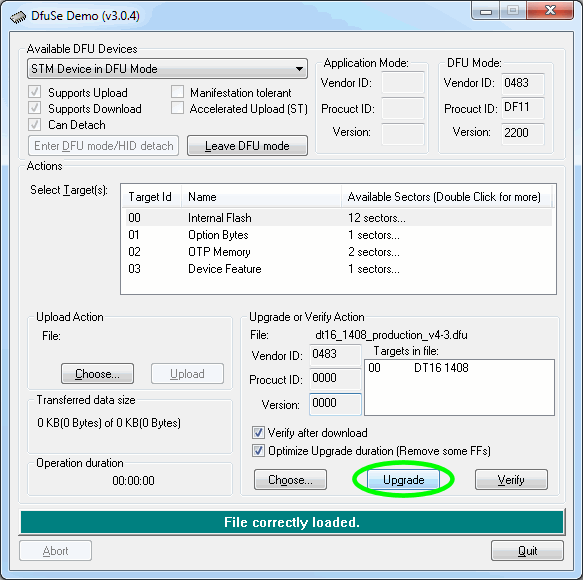
- Tick the boxes as shown, the click Choose and select the controller firmware file you downloaded above.
- Now click Upgrade:
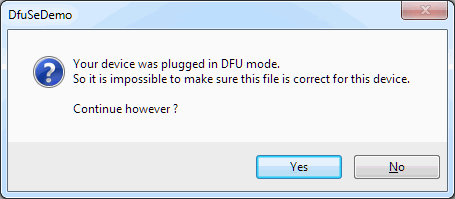
- If you see this popup below, click Yes then wait about 30 seconds. Sadly there’s a bug in the downloader and it will crash if you don’t wait for a bit. If you hear the USB boing bong sound, you’re good to proceed to the next step.
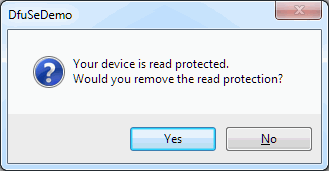
- Just say Yes. (But if you saw the read protected popup, be sure to wait about 30 seconds before clicking Yes.)
- Now the new firmware will be uploaded and at the end you’ll see this
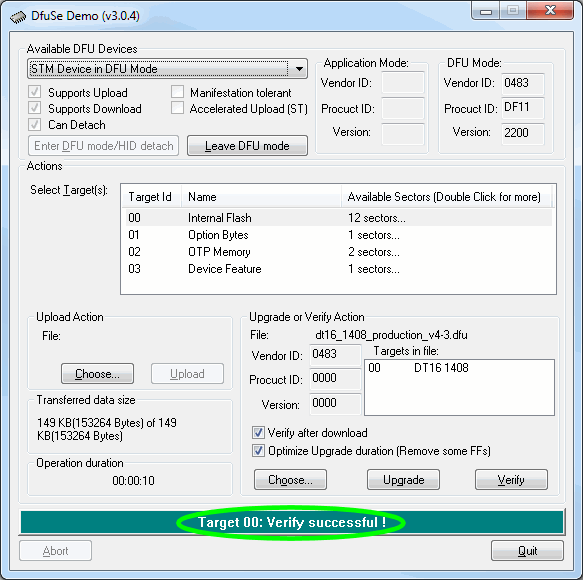
- All done. Remove the jumper and USB cable, then power cycle your controller. You’ll need to reinstall your SPLat application.
Please be sure to tick the “Verify after download” and “Optimize Upgrade duration” checkboxes before upgrading the firmware
If you’re not sure what you want, give us a call: +61 3 9773 5082