# Enables(Mask) hash function
Valid for use with hash command: HMI
Implemented on the following platforms: Windows standalone
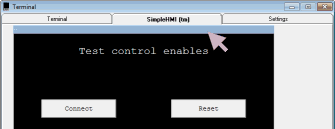
This function determines which controls will be available on the SimpleHMI screen. Mask consists of 8 semaphores packed into a single byte. Each semaphore controls the visibility of one item. This allows you to control what your Enduser will see in the standalone Windows version of SimpleHMI.
The following defines the bit (semaphore) numbers within the byte, and what they control:
| Bit | Controls | Notes |
|---|---|---|
| 0 | Connect button | |
| 1 | Reset button | |
| 2 | CLS button | |
| 3 | Rulers button | |
| 4 | A/R (aspect ratio) settings | |
| 5 | Width settings | |
| 6 | Show log button | The enduser can still set a log file name on the settings tab, so you can implement logging in your app. |
| 7 | Terminal tab | Also controls relevant settings on the Settings tab. The terminal is by default hidden in the standalone Windows SimpleHMI. It can be made visible by the command-line/shortcut switch /T |
Example program:
The following program produces a SimpleHMI screen that can be used to control the visibility of all controllable items. In a practical application you would most likely just send a fixed pattern to the SimpleHMI when you draw the initial screen.
(Click here for some tips for working around problems with copy and paste out of Internet Explorer and HTML-help (.chm) files)
;========= Test enables in standalone sHMI =========================
#       Open_Serial User(38400,8,N)
        GoSub           HMI_Connect
#       HMI ConnectEvent(HMI_Connect)
        RunTasksForever

;ON connecting to SimpleHMI, force the screen to a known width
HMI_Connect:
# HMI Reset() Cls() HideAllButtons() ScreenWidthEvent(40,evScreenWidth)
        Return

;Once the SimpleHMI acknowledges the screen width, draw the buttons.
evScreenWidth:
# HMI Cursor(1, C-10) Print("Test control enables")
# HMI ButtonEvent(, 0.2, 0.1, 0.1, 0.3, "Connect", evConnect)
# HMI ButtonEvent(, 0.2, 0.6, 0.1, 0.3, "Reset", evReset)

# HMI ButtonEvent(, 0.4, 0.1, 0.1, 0.3, "Cls", evCls)
# HMI ButtonEvent(, 0.4, 0.6, 0.1, 0.3, "Ruler", evRuler)

# HMI ButtonEvent(, 0.6, 0.1, 0.1, 0.3, "A/R", evAspect)
# HMI ButtonEvent(, 0.6, 0.6, 0.1, 0.3, "Width", evWidth)

# HMI ButtonEvent(, 0.8, 0.1, 0.1, 0.3, "Show log", evShowLog)
# HMI ButtonEvent(, 0.8, 0.6, 0.1, 0.3, "Terminal", evTerminal)

;Controlling enables. One semaphore byte
bEnables        defBYTE
;Define the enable semaphore bits
sConnect        EQU     0
sReset          EQU     1
sCls            EQU     2
sRuler          EQU     3
sAspect         EQU     4
sWidth          EQU     5
sShowLog        EQU     6
sTerminal       EQU     7

;Event handlers for each of th enable buttons.
evConnect:      LoadI   sConnect
                GoTo    ToggleEnable

evReset:        LoadI   sReset
                GoTo    ToggleEnable

evCls:          LoadI   sCls
                GoTo    ToggleEnable

evRuler:        LoadI   sRuler
                GoTo    ToggleEnable

evAspect:       LoadI   sAspect
                GoTo    ToggleEnable

evWidth:        LoadI   sWidth
                GoTo    ToggleEnable

evShowLog:      LoadI   sShowLog
                GoTo    ToggleEnable

evTerminal:     LoadI   sTerminal
                GoTo    ToggleEnable
ToggleEnable:
                IasJ:RecallS    0,bEnables
                Not
                IasJ:StoreS     0,bEnables
# HMI Enables(bEnables)                         ;Send enables mask to SimpleHMI
                Return
The Enables hash function is intended for use in cases where the standalone SimpleHMI for Windows is to be used by an enduser. It also works in the SPLat/PC version.
In the SPLat/PC version, you can restore the default settings by holding down SHIFT and clicking the blue SimpleHMI title bar.