Sequencer SPLatMap
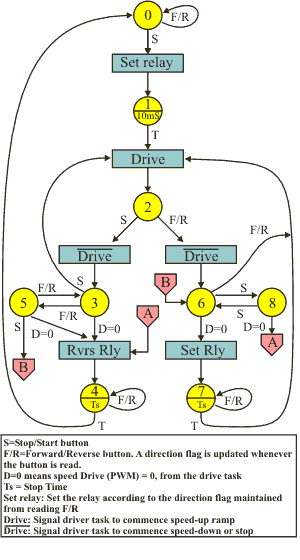
The diagram above is the SPLatMap for the main sequencer. It embodies logic that ensures that the whenever a button is pressed the system will respond in the most appropriate manner. It also provides the logic that allows the motor to reverse by slowing to a stop and then taking off in the opposite direction.
You should study this diagram until you understand it fully. If you don’t recognize the symbols you should take our free online training course.
Please note: The interactive/online training course is very old. Everything in there is valid and worth learning, especially the underlying principles. However the course pre-dates significant developments, most notably our MultiTrack multitasking technology which makes SPLat programming even easier. So, if you are relatively new to controller programming, the course will give you a good foundation, but please don’t think it represents the full SPLat story.
Some of the finer detail is left out, for clarity. For example, the diagram will only make sense if you understand that whenever the Forward/Reverse button is read, an internal direction flag (semaphore) is updated. Using a simple flag to track the user’s desired direction significantly reduces the number of states required. The event “D=0” involve a subroutine call to the driver task to find out of the motor PWM is (yet) zero.
State 0
The motor is stationary. The F/R (Forward/Reverse) button is being monitored and the direction flag is being updated. If the S (Start/Stop) button is pressed the direction relay is set according to the direction flag and we switch to state 1. This logic prevent unnecessary switching of the relay.
State 1
This exists simply to ensure that the relay has completed its switching before cranking up the PWM. In the actual code the delay can be 10mS to 20mS, because the timing is generated synchronously with the timer ticks. The relay will in practice take about 3-5mS to switch.
After the delay we command the driver task to apply power to the motor. The driver will then take care of ramping up the PWM. How fast, and to what PWM value that is done, is of no concern to the sequencer.
State 2
This is the main state for the motor running. The sequencer is now only interested in the S button and the F/R button. If S is pressed the user wants the motor to decelerate and stop. If the F/R button is pressed the user wants the motor to decelerate, stop and then accelerate up to speed in the opposite direction. During either of those sequences the system must respond correctly to additional button presses.
Whichever button is pressed, the driver task is told to ramp down the motor speed to zero. In the S case we then go to state 3. In the F/R case we go to state 6.
State 3
In state 3 we are waiting for the driver task to reduce the PWM to 0. If the user hits the S button again we go back to state 2, sending the driver module a new command to accelerate back up to speed. If the user hits F/R, we respond by switching to state 5. If neither button is pressed the driver task will eventually report zero PWM (D=0). At that stage we go into a dynamic braking sequence by reversing the relay and switching to state 4.
State 4
This state times the dynamic braking stop time. Once it is over the system reverts to the idle state.
State 5
This is a “holding state” for F/R command received during deceleration to stop. Its primary function is to ensure that if S is hit before the motor has stopped, it is treated as a deferred start command to start the motor in the opposite direction when it eventually does stop. That is done by switching to state 6, which completes the decelerate, reverse and accelerate function. If the motor PWM actually hits 0 (D=0) while in state 5, the motor is dynamically braked at state 4. Note that “Rvrs Rly” reverses the relay from its actual position, not relative to the direction flag. If the user hits F/R in state 5 it effectively cancels out the F/R that brought us to state 5, so we go back to state 3.
State 6
This is the state we are in while decelerating prior to reversing and accelerating again. If the user hits F/R again, the sequence is abandoned by resuming the drive and going back to state 4. If the user hits S, state 8 takes over. If the PWM gets to zero the relay is set to the new direction (which will be the same as dynamic braking) and state 7 times a dynamic braking period.
State 7
This provides the timing for dynamic braking. At the end of the time the motor drive (acceleration) is commenced en route to state 2.
State 8
This acts as a holding state for S button presses. Basically toggling between state 6 and 8 determines what will happen when the PWM gets to 0.