RTC: Support in SPLat/PC
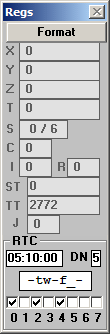
The bottom part of the SPLat/PC register display shown above represents the RTC. The items are, left to right, top to bottom:
HH:MM:SS register (05:10:00)
The processor registers HH, MM and SS are shown in a single box. They are separated by colons when displaying the time or an event, and by forward slashes when representing a date. When the simulator initially reads the time or the date, it will get the PC’s system clock. Thereafter it is possible for your SPLat program to change the time and date and write it back to the simulated clock, without affecting the PC’s clock. The simulated (SPLat/PC) will then keep its own time.
Day Number (DN)
This contains a day number in the range 0-6. It can be set and manipulated in several ways. It is often used to select one day in the Day Mask for manipulation, i.e. it acts as a pointer.
Day Mask (-tw-f_-)
Day Mask information is show in a special format that has one character per day. The 7 days are represented, starting from Monday. Only one day can be selected. The selected day can be turned on or off. If a day is ON, it is represented by the first letter of its name. If it is OFF it is represented by a hyphen or an underscore. The selected day is represented by its upper case first letter if ON or by an underscore if OFF. The following table shows all the possibilities:
| ON | OFF | |
|---|---|---|
| Selected | Upper case 1st letter | Underscore |
| Not selected | Lower case first letter | Hyphen |
For example, in the screen shot Saturday is selected (underscore) but OFF. If it was turned on the display would become
-tw-fS-
Event trips
The 8 check boxes at the bottom represent 8 events. Note that different controller products may support differing numbers of events. The SPLat/PC simulator does not “trip” simulated events when the time and day mask criteria are met. That would be impractical as a debugging tool. Instead, you can simulate a tripped event by checking (clicking) its checkbox. The event will then read out as True (tripped) the next time the program being simulated tests it.
Note that the displays described above represent the processor registers that are used to interact with the RTC. This is not the same as the RTC itself.