User programmable protocol: Sending out messages
Interacting with an external device via the serial port will frequently entail sending out messages or commands to that device. You would do this by sending the individual “components” of a message one at a time. The instructions you need are the ones that start with ComTx_ or ii under Communications instructions. The trick with the ii instructions is to use the same destination address as programmed in the #Open_Serial command, which directs the output of the instruction to the serial port (providing you have initialised it to User Programmable Protocol).
Example:
The following program will send out ASCII numeric and text strings terminated in carriage return/line feed. You can view the result using the terminal function built into SPLat/PC. Once the program is running (you should see a flashing LED on the MS120 front panel, click the SIO button on the SPLat/PC Module window. This will open up the terminal window. In the settings tab make sure the Comms parameters are 38400 for Baud and N,8,1 for Character (this is the same as on this page. Once the settings are correct, click the Terminal tab, and make sure the ASCII button is depressed. When you start pressing buttons on the MS120 you should see the data from the MS120 displayed on the black terminal display. If you now select the Hex button, you can see the same data in hex.
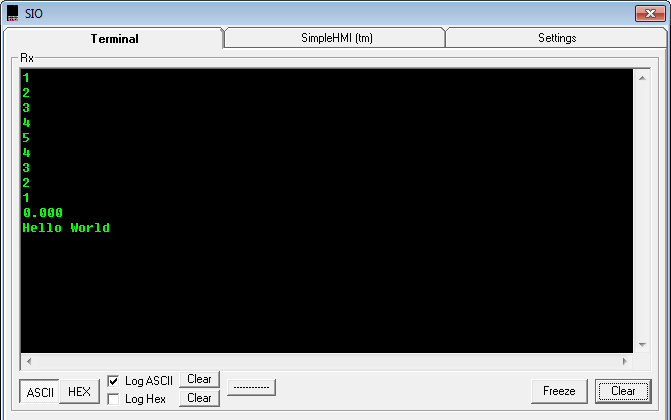
Here’s the code: (Click here for some tips for working around problems with copy and paste out of Internet Explorer and HTML-help (.chm) files)
;Example of sending ASCII stuff out the serial port. Designed for MS120, easily adapted to MMi202.
;Input button 12 increments a counter and sends its value
;Input button 13 decrements the counter and sends its value
;Input button 14 Sends a canned message
;Input button 16 deliberately crashes the program so SPLat/PC can regain control (connect).
;There is one MultiTrack task per function. Another task flashes an LED as a run indicator

          OBLCD_Dim       1,8,2                   ;Set up LCD backlight for dimming
  #       Open_Serial     Port(251) User(38400, 8, N)       ;Start up serial port 251 in "user" protocol. This will delay 10 seonds
          LaunchTask      UpCount
          LaunchTask      DnCount
          LaunchTask      CannedMsg
          LaunchTask      HeartBeat       ;Run indicator
          LaunchTask      CrashMe         ;Suicide task
          RunTasksForever

fCount  defFLOAT                        ;The up/down counter

UpCount:
          WaitOnK         12              ;Up button
          fRecallW        fCount
          fINC
          fStore          fCount
          GoSub           OutputCounter
          GoTo            UpCount

DnCount:
          WaitOnK         13              ;Dn button
          fRecallW        fCount
          fDEC
          fStore          fCount
          GoSub           OutputCounter
          GoTo            DnCount

CannedMsg:
          WaitOnK         14
          iiPrintText     251,"Hello World",'0D,'0A         ;251 is the serial port
          GoTo            CannedMsg

HeartBeat:
          On              8       ;The LED under the kill button
          Pause           2
          Off             8
          Pause           20
          GoTo            HeartBeat

CrashMe: ;Suicide
          WaitOnK         16
Die
          GoSub           Die     ;Program will restart at once (stack overflow), but with 10S delay before user comms starts up.

;Serial output counter
OutputCounter:
          fRecallW        fCount
          iifPrintWVW     251,5,0         ;251 is the serial port
          iiPrintText     251,'0D,'0A     ;Carriage return/line feed
          Return