PID implementation: Modeling your process (open loop)
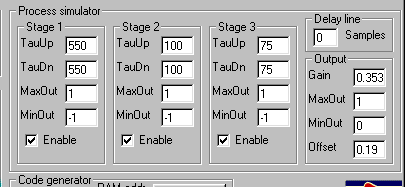
The process simulator has places for you to enter all the numbers you have now discovered in characterizing your process. It even has a few more!
The TauUp and Taudn numbers are the time constants you established in the spreadsheets. If your process is symmetrical you will have one one set of time constants, in which case you enter the same number for TauUp and TauDn. Enter those now. Gain and offset you determined by measuring the process output and sensor output. If you have an inverting process, “Up” and “Down” refer to the control input.
The MaxOut and MinOut numbers you will normally leave at 1 for MaxOut and 0 for MinOut. Any other numbers would be the result of some special knowledge you have of the internal workings of the process, such as certain stages within the process saturating.
The delay line can be used if you decide that your process has a dead time than cannot be accounted for by simple cascaded time constants. Ideally you will use it only if you have knowledge of the workings of the process that justifies it. Large delays will slow down the simulation. Also, if the process has a dead time approaching or exceeding the dominant time constant, it may be virtually impossible to control with a PID system.
Once you have entered your numbers, save the configuration with a unique file name.
If you like (this is optional but instructive) you can now test the model in open loop mode:
- Check the open loop check box (in the Controller pane)
- Set the low and high setpoints to two values that will give outputs about the same as you had in the characterisation tests you did on your real system.
- Check the Cycle check box.
- Set the horizontal scale (Horiz S/div) to approximately equal to the slowest time constant in the target system.
- “Unpress” the Pause button.
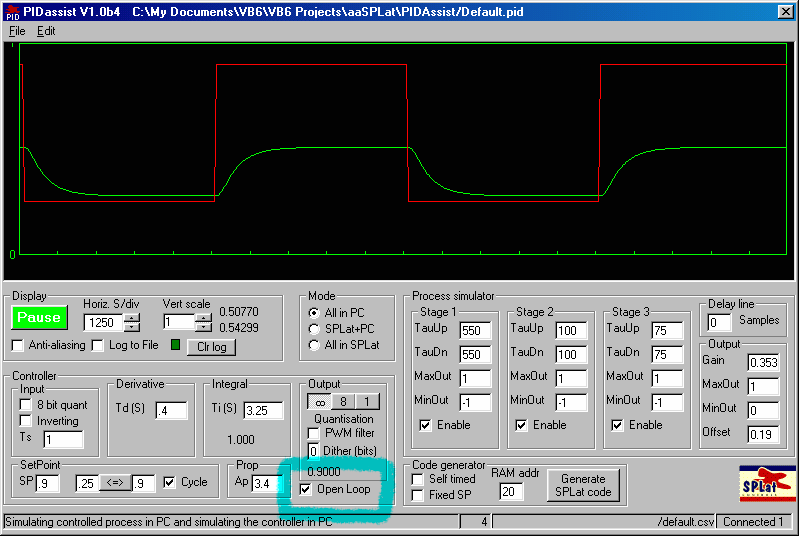
You should get a trace like the one in the above picture. If you log the simulation you should be able to compare the result with the log data from the real process, and get confirmation that your characterization is good.
Don’t confuse this with closed loop control. You are simply simulating the open loop tests you did on the real process.