# Reset({i:BGImage}{, b:BGColour}) hash function
Valid for use with hash command: HMI. Arguments may be specified as Name:Value Pairs
Implemented on the following platforms: HMi430, Android, Windows (with no arguments).
Restores the HMI to its initial state. The SimpleHMI in SPLat/PC also has a button for doing this, to assist debugging.
BGImage is an optional background image file name. If the image file is found, it will form the background (be positioned behind everything else).
BGColour is an optional background colour specifier in ARGB-Hex format.
The interaction between the image and colour are defined in this table:
| Image | Colour | Effect |
| No | No | Background colour is set to black, any existing image is removed |
| No | Yes | Background colour is set, any existing image is removed |
| Yes | No | The image is displayed and the background colour is set to transparent |
| Yes | Yes | The background colour, with alpha, appears in front of the image. |
Example:
This program will display a background image, some text over the image, and a button. It is written for the SPLat EC1 using an HC-06 Bluetooth adaptor at 9600BPS, talking to an Android device.
HMIPort         EQU     252		;Bluetooth on port 252 on EC1
#       Open_Serial Port(HMIPort) User(9600,8,N)
#       HMI Port(HMIPort)  ConnectEvent(evBGImage)
        GoSub           evBGImage    	;Paint the display at startup
        LaunchTask      tskNULL		;A do-nothing task, because I must have something!
        RunTasksForever
;--------------------------------------------------
;Clear the screen, display background and a message. This "event handler" subroutine is run
;at startup and whenever an Enduser clicks the Refresh button on the device screen.
evBGImage:
# HMI   Reset(i:"flower.jpg")	;Reset the screen, display a background image
# HMI   HideAllButtons()         ;Get rid of the default buttons
# HMI   SetBGColour(20, 20, 120)  SetFGColour(255, 0, 255) ;Set a default background, in case the image file is absent
# HMI   Cls()                    ;Remove existing text, set the screen background colour if the image fails
# HMI   Cursor(15, 5) SetBGColour(255, 0, 0, 0)  ;Note the BGColour has a 4th parameter, Alpha (transparency)
# HMI   Text("Text with transparent background")
# HMI   ButtonEvent(, -2, -10, 2, 10, "Refresh", evBGImage)
        Return

tskNULL:   ;There must be at least one running task for SimpleHMI to work.
        YieldTask
        GoTo            tskNULL
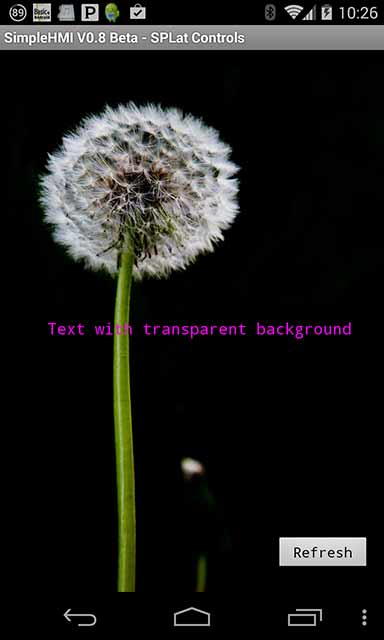
The above program will only work if the named image file is present on the Android device, in the default application image folder – see SetImagePath. You will need to place your own image in the device and ensure the name matches that in the program. If it is not there, the background will be a solid colour. You can experiment with the effects of not finding the image by renaming the file in the Android device (or in the program).
Note: File names in Android are case-sensitive.
To use the program on an MMi203, MS120, CC18 or other 8-bit SPLat board with a single serial port shared between programming and Bluetooth, change the first 2 lines to the following:
HMIPort         EQU     251		;Bluetooth on port 251 on MMi203, MS121, CC18, SL100 etc.
#       Open_Serial Port(HMIPort) User(38400,8,N)   ;Higher baudrate on these boards
See also SetImagePath, which describes file paths and their management.